A while ago sudo gem update started throwing the following error:
ERROR: Failed to build gem native extension.This wasn’t a big deal, as I wasn’t doing any any active ruby development, but it was still a minor annoyance. Missing directories reported in mkmf.log hinted at the cause:
ld: warning: directory not found for option '-L/Applications/Xcode.app/Contents/Developer/Platforms/MacOSX.platform/Developer/SDKs/MacOSX11.1.Internal.sdk/usr/local/lib'Searching for fixes resulted in a bunch of dangerous cargo-culted answers suggesting to curl -L https://get.rvm.io | bash -s stable and to then use rvm to update to the latest version of ruby. In other words — to trust that the code output from that website wasn’t malicious, and to blindly execute the code.
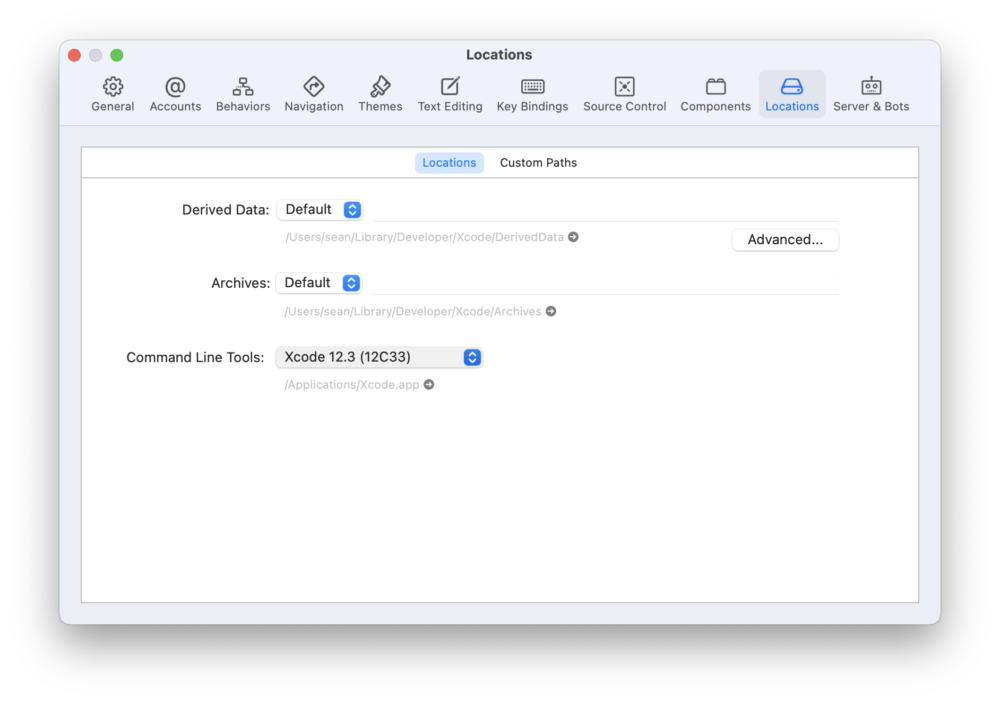
The actual solution, however, was much simpler (and didn’t require running any unknown code). It turns out that the Xcode Command Line Tools location isn’t always applied when updating Xcode. To check, simply open Xcode, and select Preferences → Locations.
If Command Line Tools is blank, or doesn’t match the currently-installed version of Xcode, then select the correct Xcode version from the dropdown menu:
That’s it. Easy, peasy, done! And the below errors are Google Juice to assist folks that are having similar issues:
Updating installed gems
Updating bigdecimal
Building native extensions. This could take a while...
ERROR:  Error installing bigdecimal:
	ERROR: Failed to build gem native extension.

    current directory: /Library/Ruby/Gems/2.6.0/gems/bigdecimal-3.0.0/ext/bigdecimal
/System/Library/Frameworks/Ruby.framework/Versions/2.6/usr/bin/ruby -I /System/Library/Frameworks/Ruby.framework/Versions/2.6/usr/lib/ruby/2.6.0 -r ./siteconf20210103-32419-1luy5zj.rb extconf.rb
checking RUBY_BIGDECIMAL_VERSION... 3.0.0
checking for labs() in stdlib.h... *** extconf.rb failed ***
Could not create Makefile due to some reason, probably lack of necessary
libraries and/or headers.  Check the mkmf.log file for more details.  You may
need configuration options.

Provided configuration options:
	--with-opt-dir
	--without-opt-dir
	--with-opt-include
	--without-opt-include=${opt-dir}/include
	--with-opt-lib
	--without-opt-lib=${opt-dir}/lib
	--with-make-prog
	--without-make-prog
	--srcdir=.
	--curdir
	--ruby=/System/Library/Frameworks/Ruby.framework/Versions/2.6/usr/bin/$(RUBY_BASE_NAME)
/System/Library/Frameworks/Ruby.framework/Versions/2.6/usr/lib/ruby/2.6.0/mkmf.rb:467:in `try_do': The compiler failed to generate an executable file. (RuntimeError)
You have to install development tools first.
	from /System/Library/Frameworks/Ruby.framework/Versions/2.6/usr/lib/ruby/2.6.0/mkmf.rb:546:in `block in try_link0'
	from /System/Library/Frameworks/Ruby.framework/Versions/2.6/usr/lib/ruby/2.6.0/tmpdir.rb:93:in `mktmpdir'
	from /System/Library/Frameworks/Ruby.framework/Versions/2.6/usr/lib/ruby/2.6.0/mkmf.rb:543:in `try_link0'
	from /System/Library/Frameworks/Ruby.framework/Versions/2.6/usr/lib/ruby/2.6.0/mkmf.rb:570:in `try_link'
	from /System/Library/Frameworks/Ruby.framework/Versions/2.6/usr/lib/ruby/2.6.0/mkmf.rb:782:in `try_func'
	from /System/Library/Frameworks/Ruby.framework/Versions/2.6/usr/lib/ruby/2.6.0/mkmf.rb:1069:in `block in have_func'
	from /System/Library/Frameworks/Ruby.framework/Versions/2.6/usr/lib/ruby/2.6.0/mkmf.rb:959:in `block in checking_for'
	from /System/Library/Frameworks/Ruby.framework/Versions/2.6/usr/lib/ruby/2.6.0/mkmf.rb:361:in `block (2 levels) in postpone'
	from /System/Library/Frameworks/Ruby.framework/Versions/2.6/usr/lib/ruby/2.6.0/mkmf.rb:331:in `open'
	from /System/Library/Frameworks/Ruby.framework/Versions/2.6/usr/lib/ruby/2.6.0/mkmf.rb:361:in `block in postpone'
	from /System/Library/Frameworks/Ruby.framework/Versions/2.6/usr/lib/ruby/2.6.0/mkmf.rb:331:in `open'
	from /System/Library/Frameworks/Ruby.framework/Versions/2.6/usr/lib/ruby/2.6.0/mkmf.rb:357:in `postpone'
	from /System/Library/Frameworks/Ruby.framework/Versions/2.6/usr/lib/ruby/2.6.0/mkmf.rb:958:in `checking_for'
	from /System/Library/Frameworks/Ruby.framework/Versions/2.6/usr/lib/ruby/2.6.0/mkmf.rb:1068:in `have_func'
	from extconf.rb:31:in `<main>'

To see why this extension failed to compile, please check the mkmf.log which can be found here:

  /Library/Ruby/Gems/2.6.0/extensions/universal-darwin-20/2.6.0/bigdecimal-3.0.0/mkmf.log

extconf failed, exit code 1

Gem files will remain installed in /Library/Ruby/Gems/2.6.0/gems/bigdecimal-3.0.0 for inspection.
Results logged to /Library/Ruby/Gems/2.6.0/extensions/universal-darwin-20/2.6.0/bigdecimal-3.0.0/gem_make.out
Updating date
Building native extensions. This could take a while...
ERROR:  Error installing date:
	ERROR: Failed to build gem native extension.

    current directory: /Library/Ruby/Gems/2.6.0/gems/date-3.1.1/ext/date
/System/Library/Frameworks/Ruby.framework/Versions/2.6/usr/bin/ruby -I /System/Library/Frameworks/Ruby.framework/Versions/2.6/usr/lib/ruby/2.6.0 -r ./siteconf20210103-32419-u08e31.rb extconf.rb
checking for timezone in time.h... *** extconf.rb failed ***
Could not create Makefile due to some reason, probably lack of necessary
libraries and/or headers.  Check the mkmf.log file for more details.  You may
need configuration options.

Provided configuration options:
	--with-opt-dir
	--without-opt-dir
	--with-opt-include
	--without-opt-include=${opt-dir}/include
	--with-opt-lib
	--without-opt-lib=${opt-dir}/lib
	--with-make-prog
	--without-make-prog
	--srcdir=.
	--curdir
	--ruby=/System/Library/Frameworks/Ruby.framework/Versions/2.6/usr/bin/$(RUBY_BASE_NAME)
/System/Library/Frameworks/Ruby.framework/Versions/2.6/usr/lib/ruby/2.6.0/mkmf.rb:467:in `try_do': The compiler failed to generate an executable file. (RuntimeError)
You have to install development tools first.
	from /System/Library/Frameworks/Ruby.framework/Versions/2.6/usr/lib/ruby/2.6.0/mkmf.rb:585:in `block in try_compile'
	from /System/Library/Frameworks/Ruby.framework/Versions/2.6/usr/lib/ruby/2.6.0/mkmf.rb:534:in `with_werror'
	from /System/Library/Frameworks/Ruby.framework/Versions/2.6/usr/lib/ruby/2.6.0/mkmf.rb:585:in `try_compile'
	from /System/Library/Frameworks/Ruby.framework/Versions/2.6/usr/lib/ruby/2.6.0/mkmf.rb:802:in `try_var'
	from /System/Library/Frameworks/Ruby.framework/Versions/2.6/usr/lib/ruby/2.6.0/mkmf.rb:1091:in `block in have_var'
	from /System/Library/Frameworks/Ruby.framework/Versions/2.6/usr/lib/ruby/2.6.0/mkmf.rb:959:in `block in checking_for'
	from /System/Library/Frameworks/Ruby.framework/Versions/2.6/usr/lib/ruby/2.6.0/mkmf.rb:361:in `block (2 levels) in postpone'
	from /System/Library/Frameworks/Ruby.framework/Versions/2.6/usr/lib/ruby/2.6.0/mkmf.rb:331:in `open'
	from /System/Library/Frameworks/Ruby.framework/Versions/2.6/usr/lib/ruby/2.6.0/mkmf.rb:361:in `block in postpone'
	from /System/Library/Frameworks/Ruby.framework/Versions/2.6/usr/lib/ruby/2.6.0/mkmf.rb:331:in `open'
	from /System/Library/Frameworks/Ruby.framework/Versions/2.6/usr/lib/ruby/2.6.0/mkmf.rb:357:in `postpone'
	from /System/Library/Frameworks/Ruby.framework/Versions/2.6/usr/lib/ruby/2.6.0/mkmf.rb:958:in `checking_for'
	from /System/Library/Frameworks/Ruby.framework/Versions/2.6/usr/lib/ruby/2.6.0/mkmf.rb:1090:in `have_var'
	from extconf.rb:6:in `<main>'

To see why this extension failed to compile, please check the mkmf.log which can be found here:

  /Library/Ruby/Gems/2.6.0/extensions/universal-darwin-20/2.6.0/date-3.1.1/mkmf.log

extconf failed, exit code 1

Gem files will remain installed in /Library/Ruby/Gems/2.6.0/gems/date-3.1.1 for inspection.
Results logged to /Library/Ruby/Gems/2.6.0/extensions/universal-darwin-20/2.6.0/date-3.1.1/gem_make.out
Updating etc
Building native extensions. This could take a while...
ERROR:  Error installing etc:
	ERROR: Failed to build gem native extension.

    current directory: /Library/Ruby/Gems/2.6.0/gems/etc-1.2.0/ext/etc
/System/Library/Frameworks/Ruby.framework/Versions/2.6/usr/bin/ruby -I /System/Library/Frameworks/Ruby.framework/Versions/2.6/usr/lib/ruby/2.6.0 -r ./siteconf20210103-32419-y7maqo.rb extconf.rb
checking for sys/utsname.h... *** extconf.rb failed ***
Could not create Makefile due to some reason, probably lack of necessary
libraries and/or headers.  Check the mkmf.log file for more details.  You may
need configuration options.

Provided configuration options:
	--with-opt-dir
	--without-opt-dir
	--with-opt-include
	--without-opt-include=${opt-dir}/include
	--with-opt-lib
	--without-opt-lib=${opt-dir}/lib
	--with-make-prog
	--without-make-prog
	--srcdir=.
	--curdir
	--ruby=/System/Library/Frameworks/Ruby.framework/Versions/2.6/usr/bin/$(RUBY_BASE_NAME)
/System/Library/Frameworks/Ruby.framework/Versions/2.6/usr/lib/ruby/2.6.0/mkmf.rb:467:in `try_do': The compiler failed to generate an executable file. (RuntimeError)
You have to install development tools first.
	from /System/Library/Frameworks/Ruby.framework/Versions/2.6/usr/lib/ruby/2.6.0/mkmf.rb:585:in `block in try_compile'
	from /System/Library/Frameworks/Ruby.framework/Versions/2.6/usr/lib/ruby/2.6.0/mkmf.rb:534:in `with_werror'
	from /System/Library/Frameworks/Ruby.framework/Versions/2.6/usr/lib/ruby/2.6.0/mkmf.rb:585:in `try_compile'
	from /System/Library/Frameworks/Ruby.framework/Versions/2.6/usr/lib/ruby/2.6.0/mkmf.rb:1109:in `block in have_header'
	from /System/Library/Frameworks/Ruby.framework/Versions/2.6/usr/lib/ruby/2.6.0/mkmf.rb:959:in `block in checking_for'
	from /System/Library/Frameworks/Ruby.framework/Versions/2.6/usr/lib/ruby/2.6.0/mkmf.rb:361:in `block (2 levels) in postpone'
	from /System/Library/Frameworks/Ruby.framework/Versions/2.6/usr/lib/ruby/2.6.0/mkmf.rb:331:in `open'
	from /System/Library/Frameworks/Ruby.framework/Versions/2.6/usr/lib/ruby/2.6.0/mkmf.rb:361:in `block in postpone'
	from /System/Library/Frameworks/Ruby.framework/Versions/2.6/usr/lib/ruby/2.6.0/mkmf.rb:331:in `open'
	from /System/Library/Frameworks/Ruby.framework/Versions/2.6/usr/lib/ruby/2.6.0/mkmf.rb:357:in `postpone'
	from /System/Library/Frameworks/Ruby.framework/Versions/2.6/usr/lib/ruby/2.6.0/mkmf.rb:958:in `checking_for'
	from /System/Library/Frameworks/Ruby.framework/Versions/2.6/usr/lib/ruby/2.6.0/mkmf.rb:1108:in `have_header'
	from extconf.rb:6:in `block in <main>'
	from extconf.rb:5:in `each'
	from extconf.rb:5:in `<main>'

To see why this extension failed to compile, please check the mkmf.log which can be found here:

  /Library/Ruby/Gems/2.6.0/extensions/universal-darwin-20/2.6.0/etc-1.2.0/mkmf.log

extconf failed, exit code 1

Gem files will remain installed in /Library/Ruby/Gems/2.6.0/gems/etc-1.2.0 for inspection.
Results logged to /Library/Ruby/Gems/2.6.0/extensions/universal-darwin-20/2.6.0/etc-1.2.0/gem_make.out
Updating ffi
Building native extensions. This could take a while...
ERROR:  Error installing ffi:
	ERROR: Failed to build gem native extension.

    current directory: /Library/Ruby/Gems/2.6.0/gems/ffi-1.14.2/ext/ffi_c
/System/Library/Frameworks/Ruby.framework/Versions/2.6/usr/bin/ruby -I /System/Library/Frameworks/Ruby.framework/Versions/2.6/usr/lib/ruby/2.6.0 -r ./siteconf20210103-32419-224jk5.rb extconf.rb
checking for ffi.h... *** extconf.rb failed ***
Could not create Makefile due to some reason, probably lack of necessary
libraries and/or headers.  Check the mkmf.log file for more details.  You may
need configuration options.

Provided configuration options:
	--with-opt-dir
	--without-opt-dir
	--with-opt-include
	--without-opt-include=${opt-dir}/include
	--with-opt-lib
	--without-opt-lib=${opt-dir}/lib
	--with-make-prog
	--without-make-prog
	--srcdir=.
	--curdir
	--ruby=/System/Library/Frameworks/Ruby.framework/Versions/2.6/usr/bin/$(RUBY_BASE_NAME)
	--with-ffi_c-dir
	--without-ffi_c-dir
	--with-ffi_c-include
	--without-ffi_c-include=${ffi_c-dir}/include
	--with-ffi_c-lib
	--without-ffi_c-lib=${ffi_c-dir}/lib
	--enable-system-libffi
	--disable-system-libffi
	--with-libffi-config
	--without-libffi-config
	--with-pkg-config
	--without-pkg-config
/System/Library/Frameworks/Ruby.framework/Versions/2.6/usr/lib/ruby/2.6.0/mkmf.rb:467:in `try_do': The compiler failed to generate an executable file. (RuntimeError)
You have to install development tools first.
	from /System/Library/Frameworks/Ruby.framework/Versions/2.6/usr/lib/ruby/2.6.0/mkmf.rb:585:in `block in try_compile'
	from /System/Library/Frameworks/Ruby.framework/Versions/2.6/usr/lib/ruby/2.6.0/mkmf.rb:534:in `with_werror'
	from /System/Library/Frameworks/Ruby.framework/Versions/2.6/usr/lib/ruby/2.6.0/mkmf.rb:585:in `try_compile'
	from /System/Library/Frameworks/Ruby.framework/Versions/2.6/usr/lib/ruby/2.6.0/mkmf.rb:1109:in `block in have_header'
	from /System/Library/Frameworks/Ruby.framework/Versions/2.6/usr/lib/ruby/2.6.0/mkmf.rb:959:in `block in checking_for'
	from /System/Library/Frameworks/Ruby.framework/Versions/2.6/usr/lib/ruby/2.6.0/mkmf.rb:361:in `block (2 levels) in postpone'
	from /System/Library/Frameworks/Ruby.framework/Versions/2.6/usr/lib/ruby/2.6.0/mkmf.rb:331:in `open'
	from /System/Library/Frameworks/Ruby.framework/Versions/2.6/usr/lib/ruby/2.6.0/mkmf.rb:361:in `block in postpone'
	from /System/Library/Frameworks/Ruby.framework/Versions/2.6/usr/lib/ruby/2.6.0/mkmf.rb:331:in `open'
	from /System/Library/Frameworks/Ruby.framework/Versions/2.6/usr/lib/ruby/2.6.0/mkmf.rb:357:in `postpone'
	from /System/Library/Frameworks/Ruby.framework/Versions/2.6/usr/lib/ruby/2.6.0/mkmf.rb:958:in `checking_for'
	from /System/Library/Frameworks/Ruby.framework/Versions/2.6/usr/lib/ruby/2.6.0/mkmf.rb:1108:in `have_header'
	from extconf.rb:10:in `system_libffi_usable?'
	from extconf.rb:42:in `<main>'

To see why this extension failed to compile, please check the mkmf.log which can be found here:

  /Library/Ruby/Gems/2.6.0/extensions/universal-darwin-20/2.6.0/ffi-1.14.2/mkmf.log

extconf failed, exit code 1

Gem files will remain installed in /Library/Ruby/Gems/2.6.0/gems/ffi-1.14.2 for inspection.
Results logged to /Library/Ruby/Gems/2.6.0/extensions/universal-darwin-20/2.6.0/ffi-1.14.2/gem_make.out
Updating fiddle
Building native extensions. This could take a while...
ERROR:  Error installing fiddle:
	ERROR: Failed to build gem native extension.

    current directory: /Library/Ruby/Gems/2.6.0/gems/fiddle-1.0.7/ext/fiddle
/System/Library/Frameworks/Ruby.framework/Versions/2.6/usr/bin/ruby -I /System/Library/Frameworks/Ruby.framework/Versions/2.6/usr/lib/ruby/2.6.0 -r ./siteconf20210103-32419-wsxvtp.rb extconf.rb
checking for ffi.h... *** extconf.rb failed ***
Could not create Makefile due to some reason, probably lack of necessary
libraries and/or headers.  Check the mkmf.log file for more details.  You may
need configuration options.

Provided configuration options:
	--with-opt-dir
	--without-opt-dir
	--with-opt-include
	--without-opt-include=${opt-dir}/include
	--with-opt-lib
	--without-opt-lib=${opt-dir}/lib
	--with-make-prog
	--without-make-prog
	--srcdir=.
	--curdir
	--ruby=/System/Library/Frameworks/Ruby.framework/Versions/2.6/usr/bin/$(RUBY_BASE_NAME)
	--enable-bundled-libffi
	--disable-bundled-libffi
	--with-libffi-dir
	--without-libffi-dir
	--with-libffi-include
	--without-libffi-include=${libffi-dir}/include
	--with-libffi-lib
	--without-libffi-lib=${libffi-dir}/lib
	--with-libffi-config
	--without-libffi-config
	--with-pkg-config
	--without-pkg-config
/System/Library/Frameworks/Ruby.framework/Versions/2.6/usr/lib/ruby/2.6.0/mkmf.rb:467:in `try_do': The compiler failed to generate an executable file. (RuntimeError)
You have to install development tools first.
	from /System/Library/Frameworks/Ruby.framework/Versions/2.6/usr/lib/ruby/2.6.0/mkmf.rb:585:in `block in try_compile'
	from /System/Library/Frameworks/Ruby.framework/Versions/2.6/usr/lib/ruby/2.6.0/mkmf.rb:534:in `with_werror'
	from /System/Library/Frameworks/Ruby.framework/Versions/2.6/usr/lib/ruby/2.6.0/mkmf.rb:585:in `try_compile'
	from /System/Library/Frameworks/Ruby.framework/Versions/2.6/usr/lib/ruby/2.6.0/mkmf.rb:1109:in `block in have_header'
	from /System/Library/Frameworks/Ruby.framework/Versions/2.6/usr/lib/ruby/2.6.0/mkmf.rb:959:in `block in checking_for'
	from /System/Library/Frameworks/Ruby.framework/Versions/2.6/usr/lib/ruby/2.6.0/mkmf.rb:361:in `block (2 levels) in postpone'
	from /System/Library/Frameworks/Ruby.framework/Versions/2.6/usr/lib/ruby/2.6.0/mkmf.rb:331:in `open'
	from /System/Library/Frameworks/Ruby.framework/Versions/2.6/usr/lib/ruby/2.6.0/mkmf.rb:361:in `block in postpone'
	from /System/Library/Frameworks/Ruby.framework/Versions/2.6/usr/lib/ruby/2.6.0/mkmf.rb:331:in `open'
	from /System/Library/Frameworks/Ruby.framework/Versions/2.6/usr/lib/ruby/2.6.0/mkmf.rb:357:in `postpone'
	from /System/Library/Frameworks/Ruby.framework/Versions/2.6/usr/lib/ruby/2.6.0/mkmf.rb:958:in `checking_for'
	from /System/Library/Frameworks/Ruby.framework/Versions/2.6/usr/lib/ruby/2.6.0/mkmf.rb:1108:in `have_header'
	from extconf.rb:17:in `<main>'

To see why this extension failed to compile, please check the mkmf.log which can be found here:

  /Library/Ruby/Gems/2.6.0/extensions/universal-darwin-20/2.6.0/fiddle-1.0.7/mkmf.log

extconf failed, exit code 1

Gem files will remain installed in /Library/Ruby/Gems/2.6.0/gems/fiddle-1.0.7 for inspection.
Results logged to /Library/Ruby/Gems/2.6.0/extensions/universal-darwin-20/2.6.0/fiddle-1.0.7/gem_make.out
Updating irb
ERROR:  Error installing irb:
	ERROR: Failed to build gem native extension.

    current directory: /Library/Ruby/Gems/2.6.0/gems/io-console-0.5.6/ext/io/console
/System/Library/Frameworks/Ruby.framework/Versions/2.6/usr/bin/ruby -I /System/Library/Frameworks/Ruby.framework/Versions/2.6/usr/lib/ruby/2.6.0 -r ./siteconf20210103-32419-mhy66h.rb extconf.rb
/System/Library/Frameworks/Ruby.framework/Versions/2.6/usr/lib/ruby/2.6.0/mkmf.rb:467:in `try_do': The compiler failed to generate an executable file. (RuntimeError)
You have to install development tools first.
	from /System/Library/Frameworks/Ruby.framework/Versions/2.6/usr/lib/ruby/2.6.0/mkmf.rb:585:in `block in try_compile'
	from /System/Library/Frameworks/Ruby.framework/Versions/2.6/usr/lib/ruby/2.6.0/mkmf.rb:534:in `with_werror'
	from /System/Library/Frameworks/Ruby.framework/Versions/2.6/usr/lib/ruby/2.6.0/mkmf.rb:585:in `try_compile'
	from /System/Library/Frameworks/Ruby.framework/Versions/2.6/usr/lib/ruby/2.6.0/mkmf.rb:852:in `macro_defined?'
	from extconf.rb:7:in `<main>'

To see why this extension failed to compile, please check the mkmf.log which can be found here:

  /Library/Ruby/Gems/2.6.0/extensions/universal-darwin-20/2.6.0/io-console-0.5.6/mkmf.log

extconf failed, exit code 1

Gem files will remain installed in /Library/Ruby/Gems/2.6.0/gems/io-console-0.5.6 for inspection.
Results logged to /Library/Ruby/Gems/2.6.0/extensions/universal-darwin-20/2.6.0/io-console-0.5.6/gem_make.out
Updating jekyll
ERROR:  Error installing jekyll:
	ERROR: Failed to build gem native extension.

    current directory: /Library/Ruby/Gems/2.6.0/gems/http_parser.rb-0.6.0/ext/ruby_http_parser
/System/Library/Frameworks/Ruby.framework/Versions/2.6/usr/bin/ruby -I /System/Library/Frameworks/Ruby.framework/Versions/2.6/usr/lib/ruby/2.6.0 -r ./siteconf20210103-32419-ipbh9a.rb extconf.rb
creating Makefile

current directory: /Library/Ruby/Gems/2.6.0/gems/http_parser.rb-0.6.0/ext/ruby_http_parser
make "DESTDIR=" clean

current directory: /Library/Ruby/Gems/2.6.0/gems/http_parser.rb-0.6.0/ext/ruby_http_parser
make "DESTDIR="
make: *** No rule to make target `/Library/Developer/CommandLineTools/SDKs/MacOSX.sdk/System/Library/Frameworks/Ruby.framework/Versions/2.6/usr/include/ruby-2.6.0/universal-darwin20/ruby/config.h', needed by `ruby_http_parser.o'.  Stop.

make failed, exit code 2

Gem files will remain installed in /Library/Ruby/Gems/2.6.0/gems/http_parser.rb-0.6.0 for inspection.
Results logged to /Library/Ruby/Gems/2.6.0/extensions/universal-darwin-20/2.6.0/http_parser.rb-0.6.0/gem_make.out
Updating json
Building native extensions. This could take a while...
ERROR:  Error installing json:
	ERROR: Failed to build gem native extension.

    current directory: /Library/Ruby/Gems/2.6.0/gems/json-2.5.1/ext/json/ext/generator
/System/Library/Frameworks/Ruby.framework/Versions/2.6/usr/bin/ruby -I /System/Library/Frameworks/Ruby.framework/Versions/2.6/usr/lib/ruby/2.6.0 -r ./siteconf20210103-32419-t5kci9.rb extconf.rb
creating Makefile

current directory: /Library/Ruby/Gems/2.6.0/gems/json-2.5.1/ext/json/ext/generator
make "DESTDIR=" clean

current directory: /Library/Ruby/Gems/2.6.0/gems/json-2.5.1/ext/json/ext/generator
make "DESTDIR="
compiling generator.c
In file included from generator.c:1:
In file included from ./../fbuffer/fbuffer.h:5:
In file included from /Library/Developer/CommandLineTools/SDKs/MacOSX.sdk/System/Library/Frameworks/Ruby.framework/Versions/2.6/usr/include/ruby-2.6.0/ruby.h:33:
/Library/Developer/CommandLineTools/SDKs/MacOSX.sdk/System/Library/Frameworks/Ruby.framework/Versions/2.6/usr/include/ruby-2.6.0/ruby/ruby.h:24:10: fatal error: 'ruby/config.h' file not found
#include "ruby/config.h"
         ^~~~~~~~~~~~~~~
/Library/Developer/CommandLineTools/SDKs/MacOSX.sdk/System/Library/Frameworks/Ruby.framework/Versions/2.6/usr/include/ruby-2.6.0/ruby/ruby.h:24:10: note: did not find header 'config.h' in framework 'ruby' (loaded from '/Library/Developer/CommandLineTools/SDKs/MacOSX.sdk/System/Library/Frameworks')
1 error generated.
make: *** [generator.o] Error 1

make failed, exit code 2

Gem files will remain installed in /Library/Ruby/Gems/2.6.0/gems/json-2.5.1 for inspection.
Results logged to /Library/Ruby/Gems/2.6.0/extensions/universal-darwin-20/2.6.0/json-2.5.1/gem_make.out
Updating libxml-ruby
Building native extensions. This could take a while...
ERROR:  Error installing libxml-ruby:
	ERROR: Failed to build gem native extension.

    current directory: /Library/Ruby/Gems/2.6.0/gems/libxml-ruby-3.2.1/ext/libxml
/System/Library/Frameworks/Ruby.framework/Versions/2.6/usr/bin/ruby -I /System/Library/Frameworks/Ruby.framework/Versions/2.6/usr/lib/ruby/2.6.0 -r ./siteconf20210103-32419-xhczq.rb extconf.rb
/System/Library/Frameworks/Ruby.framework/Versions/2.6/usr/bin/ruby: warning: shebang line ending with \r may cause problems
checking for libxml/xmlversion.h in /opt/include/libxml2,/opt/local/include/libxml2,/usr/local/include/libxml2,/usr/include/libxml2,/usr/local/include... *** extconf.rb failed ***
Could not create Makefile due to some reason, probably lack of necessary
libraries and/or headers.  Check the mkmf.log file for more details.  You may
need configuration options.

Provided configuration options:
	--with-opt-dir
	--without-opt-dir
	--with-opt-include
	--without-opt-include=${opt-dir}/include
	--with-opt-lib
	--without-opt-lib=${opt-dir}/lib
	--with-make-prog
	--without-make-prog
	--srcdir=.
	--curdir
	--ruby=/System/Library/Frameworks/Ruby.framework/Versions/2.6/usr/bin/$(RUBY_BASE_NAME)
	--with-xml2-config
	--without-xml2-config
	--with-xml2-dir
	--without-xml2-dir
	--with-xml2-include
	--without-xml2-include=${xml2-dir}/include
	--with-xml2-lib
	--without-xml2-lib=${xml2-dir}/lib
/System/Library/Frameworks/Ruby.framework/Versions/2.6/usr/lib/ruby/2.6.0/mkmf.rb:467:in `try_do': The compiler failed to generate an executable file. (RuntimeError)
You have to install development tools first.
	from /System/Library/Frameworks/Ruby.framework/Versions/2.6/usr/lib/ruby/2.6.0/mkmf.rb:585:in `block in try_compile'
	from /System/Library/Frameworks/Ruby.framework/Versions/2.6/usr/lib/ruby/2.6.0/mkmf.rb:534:in `with_werror'
	from /System/Library/Frameworks/Ruby.framework/Versions/2.6/usr/lib/ruby/2.6.0/mkmf.rb:585:in `try_compile'
	from /System/Library/Frameworks/Ruby.framework/Versions/2.6/usr/lib/ruby/2.6.0/mkmf.rb:1162:in `block in find_header'
	from /System/Library/Frameworks/Ruby.framework/Versions/2.6/usr/lib/ruby/2.6.0/mkmf.rb:959:in `block in checking_for'
	from /System/Library/Frameworks/Ruby.framework/Versions/2.6/usr/lib/ruby/2.6.0/mkmf.rb:361:in `block (2 levels) in postpone'
	from /System/Library/Frameworks/Ruby.framework/Versions/2.6/usr/lib/ruby/2.6.0/mkmf.rb:331:in `open'
	from /System/Library/Frameworks/Ruby.framework/Versions/2.6/usr/lib/ruby/2.6.0/mkmf.rb:361:in `block in postpone'
	from /System/Library/Frameworks/Ruby.framework/Versions/2.6/usr/lib/ruby/2.6.0/mkmf.rb:331:in `open'
	from /System/Library/Frameworks/Ruby.framework/Versions/2.6/usr/lib/ruby/2.6.0/mkmf.rb:357:in `postpone'
	from /System/Library/Frameworks/Ruby.framework/Versions/2.6/usr/lib/ruby/2.6.0/mkmf.rb:958:in `checking_for'
	from /System/Library/Frameworks/Ruby.framework/Versions/2.6/usr/lib/ruby/2.6.0/mkmf.rb:1161:in `find_header'
	from extconf.rb:28:in `<main>'

To see why this extension failed to compile, please check the mkmf.log which can be found here:

  /Library/Ruby/Gems/2.6.0/extensions/universal-darwin-20/2.6.0/libxml-ruby-3.2.1/mkmf.log

extconf failed, exit code 1

Gem files will remain installed in /Library/Ruby/Gems/2.6.0/gems/libxml-ruby-3.2.1 for inspection.
Results logged to /Library/Ruby/Gems/2.6.0/extensions/universal-darwin-20/2.6.0/libxml-ruby-3.2.1/gem_make.out
Updating listen
ERROR:  Error installing listen:
	ERROR: Failed to build gem native extension.

    current directory: /Library/Ruby/Gems/2.6.0/gems/ffi-1.13.1/ext/ffi_c
/System/Library/Frameworks/Ruby.framework/Versions/2.6/usr/bin/ruby -I /System/Library/Frameworks/Ruby.framework/Versions/2.6/usr/lib/ruby/2.6.0 -r ./siteconf20210103-32419-btb6k0.rb extconf.rb
checking for ffi.h... /System/Library/Frameworks/Ruby.framework/Versions/2.6/usr/lib/ruby/2.6.0/mkmf.rb:467:in `try_do': The compiler failed to generate an executable file. (RuntimeError)
You have to install development tools first.
	from /System/Library/Frameworks/Ruby.framework/Versions/2.6/usr/lib/ruby/2.6.0/mkmf.rb:585:in `block in try_compile'
	from /System/Library/Frameworks/Ruby.framework/Versions/2.6/usr/lib/ruby/2.6.0/mkmf.rb:534:in `with_werror'
	from /System/Library/Frameworks/Ruby.framework/Versions/2.6/usr/lib/ruby/2.6.0/mkmf.rb:585:in `try_compile'
	from /System/Library/Frameworks/Ruby.framework/Versions/2.6/usr/lib/ruby/2.6.0/mkmf.rb:1109:in `block in have_header'
	from /System/Library/Frameworks/Ruby.framework/Versions/2.6/usr/lib/ruby/2.6.0/mkmf.rb:959:in `block in checking_for'
	from /System/Library/Frameworks/Ruby.framework/Versions/2.6/usr/lib/ruby/2.6.0/mkmf.rb:361:in `block (2 levels) in postpone'
	from /System/Library/Frameworks/Ruby.framework/Versions/2.6/usr/lib/ruby/2.6.0/mkmf.rb:331:in `open'
	from /System/Library/Frameworks/Ruby.framework/Versions/2.6/usr/lib/ruby/2.6.0/mkmf.rb:361:in `block in postpone'
	from /System/Library/Frameworks/Ruby.framework/Versions/2.6/usr/lib/ruby/2.6.0/mkmf.rb:331:in `open'
	from /System/Library/Frameworks/Ruby.framework/Versions/2.6/usr/lib/ruby/2.6.0/mkmf.rb:357:in `postpone'
	from /System/Library/Frameworks/Ruby.framework/Versions/2.6/usr/lib/ruby/2.6.0/mkmf.rb:958:in `checking_for'
	from /System/Library/Frameworks/Ruby.framework/Versions/2.6/usr/lib/ruby/2.6.0/mkmf.rb:1108:in `have_header'
	from extconf.rb:10:in `system_libffi_usable?'
	from extconf.rb:42:in `<main>'

To see why this extension failed to compile, please check the mkmf.log which can be found here:

  /Library/Ruby/Gems/2.6.0/extensions/universal-darwin-20/2.6.0/ffi-1.13.1/mkmf.log

extconf failed, exit code 1

Gem files will remain installed in /Library/Ruby/Gems/2.6.0/gems/ffi-1.13.1 for inspection.
Results logged to /Library/Ruby/Gems/2.6.0/extensions/universal-darwin-20/2.6.0/ffi-1.13.1/gem_make.out
Updating openssl
Building native extensions. This could take a while...
ERROR:  Error installing openssl:
	ERROR: Failed to build gem native extension.

    current directory: /Library/Ruby/Gems/2.6.0/gems/openssl-2.2.0/ext/openssl
/System/Library/Frameworks/Ruby.framework/Versions/2.6/usr/bin/ruby -I /System/Library/Frameworks/Ruby.framework/Versions/2.6/usr/lib/ruby/2.6.0 -r ./siteconf20210103-32419-1yoyjh5.rb extconf.rb
checking for t_open() in -lnsl... *** extconf.rb failed ***
Could not create Makefile due to some reason, probably lack of necessary
libraries and/or headers.  Check the mkmf.log file for more details.  You may
need configuration options.

Provided configuration options:
	--with-opt-dir
	--without-opt-dir
	--with-opt-include
	--without-opt-include=${opt-dir}/include
	--with-opt-lib
	--without-opt-lib=${opt-dir}/lib
	--with-make-prog
	--without-make-prog
	--srcdir=.
	--curdir
	--ruby=/System/Library/Frameworks/Ruby.framework/Versions/2.6/usr/bin/$(RUBY_BASE_NAME)
	--with-openssl-dir
	--with-openssl-include
	--without-openssl-include=${openssl-dir}/include
	--with-openssl-lib
	--without-openssl-lib=${openssl-dir}/lib
	--with-kerberos-dir
	--without-kerberos-dir
	--with-kerberos-include
	--without-kerberos-include=${kerberos-dir}/include
	--with-kerberos-lib
	--without-kerberos-lib=${kerberos-dir}/lib
	--with-debug
	--without-debug
	--enable-debug
	--disable-debug
	--with-nsllib
	--without-nsllib
/System/Library/Frameworks/Ruby.framework/Versions/2.6/usr/lib/ruby/2.6.0/mkmf.rb:467:in `try_do': The compiler failed to generate an executable file. (RuntimeError)
You have to install development tools first.
	from /System/Library/Frameworks/Ruby.framework/Versions/2.6/usr/lib/ruby/2.6.0/mkmf.rb:546:in `block in try_link0'
	from /System/Library/Frameworks/Ruby.framework/Versions/2.6/usr/lib/ruby/2.6.0/tmpdir.rb:93:in `mktmpdir'
	from /System/Library/Frameworks/Ruby.framework/Versions/2.6/usr/lib/ruby/2.6.0/mkmf.rb:543:in `try_link0'
	from /System/Library/Frameworks/Ruby.framework/Versions/2.6/usr/lib/ruby/2.6.0/mkmf.rb:570:in `try_link'
	from /System/Library/Frameworks/Ruby.framework/Versions/2.6/usr/lib/ruby/2.6.0/mkmf.rb:782:in `try_func'
	from /System/Library/Frameworks/Ruby.framework/Versions/2.6/usr/lib/ruby/2.6.0/mkmf.rb:1016:in `block in have_library'
	from /System/Library/Frameworks/Ruby.framework/Versions/2.6/usr/lib/ruby/2.6.0/mkmf.rb:959:in `block in checking_for'
	from /System/Library/Frameworks/Ruby.framework/Versions/2.6/usr/lib/ruby/2.6.0/mkmf.rb:361:in `block (2 levels) in postpone'
	from /System/Library/Frameworks/Ruby.framework/Versions/2.6/usr/lib/ruby/2.6.0/mkmf.rb:331:in `open'
	from /System/Library/Frameworks/Ruby.framework/Versions/2.6/usr/lib/ruby/2.6.0/mkmf.rb:361:in `block in postpone'
	from /System/Library/Frameworks/Ruby.framework/Versions/2.6/usr/lib/ruby/2.6.0/mkmf.rb:331:in `open'
	from /System/Library/Frameworks/Ruby.framework/Versions/2.6/usr/lib/ruby/2.6.0/mkmf.rb:357:in `postpone'
	from /System/Library/Frameworks/Ruby.framework/Versions/2.6/usr/lib/ruby/2.6.0/mkmf.rb:958:in `checking_for'
	from /System/Library/Frameworks/Ruby.framework/Versions/2.6/usr/lib/ruby/2.6.0/mkmf.rb:1011:in `have_library'
	from extconf.rb:30:in `<main>'

To see why this extension failed to compile, please check the mkmf.log which can be found here:

  /Library/Ruby/Gems/2.6.0/extensions/universal-darwin-20/2.6.0/openssl-2.2.0/mkmf.log

extconf failed, exit code 1

Gem files will remain installed in /Library/Ruby/Gems/2.6.0/gems/openssl-2.2.0 for inspection.
Results logged to /Library/Ruby/Gems/2.6.0/extensions/universal-darwin-20/2.6.0/openssl-2.2.0/gem_make.out
Updating psych
Building native extensions. This could take a while...
ERROR:  Error installing psych:
	ERROR: Failed to build gem native extension.

    current directory: /Library/Ruby/Gems/2.6.0/gems/psych-3.3.0/ext/psych
/System/Library/Frameworks/Ruby.framework/Versions/2.6/usr/bin/ruby -I /System/Library/Frameworks/Ruby.framework/Versions/2.6/usr/lib/ruby/2.6.0 -r ./siteconf20210103-32419-1si57tx.rb extconf.rb
checking for yaml.h... *** extconf.rb failed ***
Could not create Makefile due to some reason, probably lack of necessary
libraries and/or headers.  Check the mkmf.log file for more details.  You may
need configuration options.

Provided configuration options:
	--with-opt-dir
	--without-opt-dir
	--with-opt-include
	--without-opt-include=${opt-dir}/include
	--with-opt-lib
	--without-opt-lib=${opt-dir}/lib
	--with-make-prog
	--without-make-prog
	--srcdir=.
	--curdir
	--ruby=/System/Library/Frameworks/Ruby.framework/Versions/2.6/usr/bin/$(RUBY_BASE_NAME)
	--with-libyaml-dir
	--without-libyaml-dir
	--with-libyaml-include
	--without-libyaml-include=${libyaml-dir}/include
	--with-libyaml-lib
	--without-libyaml-lib=${libyaml-dir}/lib
	--enable-bundled-libyaml
	--disable-bundled-libyaml
/System/Library/Frameworks/Ruby.framework/Versions/2.6/usr/lib/ruby/2.6.0/mkmf.rb:467:in `try_do': The compiler failed to generate an executable file. (RuntimeError)
You have to install development tools first.
	from /System/Library/Frameworks/Ruby.framework/Versions/2.6/usr/lib/ruby/2.6.0/mkmf.rb:585:in `block in try_compile'
	from /System/Library/Frameworks/Ruby.framework/Versions/2.6/usr/lib/ruby/2.6.0/mkmf.rb:534:in `with_werror'
	from /System/Library/Frameworks/Ruby.framework/Versions/2.6/usr/lib/ruby/2.6.0/mkmf.rb:585:in `try_compile'
	from /System/Library/Frameworks/Ruby.framework/Versions/2.6/usr/lib/ruby/2.6.0/mkmf.rb:1162:in `block in find_header'
	from /System/Library/Frameworks/Ruby.framework/Versions/2.6/usr/lib/ruby/2.6.0/mkmf.rb:959:in `block in checking_for'
	from /System/Library/Frameworks/Ruby.framework/Versions/2.6/usr/lib/ruby/2.6.0/mkmf.rb:361:in `block (2 levels) in postpone'
	from /System/Library/Frameworks/Ruby.framework/Versions/2.6/usr/lib/ruby/2.6.0/mkmf.rb:331:in `open'
	from /System/Library/Frameworks/Ruby.framework/Versions/2.6/usr/lib/ruby/2.6.0/mkmf.rb:361:in `block in postpone'
	from /System/Library/Frameworks/Ruby.framework/Versions/2.6/usr/lib/ruby/2.6.0/mkmf.rb:331:in `open'
	from /System/Library/Frameworks/Ruby.framework/Versions/2.6/usr/lib/ruby/2.6.0/mkmf.rb:357:in `postpone'
	from /System/Library/Frameworks/Ruby.framework/Versions/2.6/usr/lib/ruby/2.6.0/mkmf.rb:958:in `checking_for'
	from /System/Library/Frameworks/Ruby.framework/Versions/2.6/usr/lib/ruby/2.6.0/mkmf.rb:1161:in `find_header'
	from extconf.rb:10:in `<main>'

To see why this extension failed to compile, please check the mkmf.log which can be found here:

  /Library/Ruby/Gems/2.6.0/extensions/universal-darwin-20/2.6.0/psych-3.3.0/mkmf.log

extconf failed, exit code 1

Gem files will remain installed in /Library/Ruby/Gems/2.6.0/gems/psych-3.3.0 for inspection.
Results logged to /Library/Ruby/Gems/2.6.0/extensions/universal-darwin-20/2.6.0/psych-3.3.0/gem_make.out
Updating reline
ERROR:  Error installing reline:
	ERROR: Failed to build gem native extension.

    current directory: /Library/Ruby/Gems/2.6.0/gems/io-console-0.5.6/ext/io/console
/System/Library/Frameworks/Ruby.framework/Versions/2.6/usr/bin/ruby -I /System/Library/Frameworks/Ruby.framework/Versions/2.6/usr/lib/ruby/2.6.0 -r ./siteconf20210103-32419-im8ypq.rb extconf.rb
/System/Library/Frameworks/Ruby.framework/Versions/2.6/usr/lib/ruby/2.6.0/mkmf.rb:467:in `try_do': The compiler failed to generate an executable file. (RuntimeError)
You have to install development tools first.
	from /System/Library/Frameworks/Ruby.framework/Versions/2.6/usr/lib/ruby/2.6.0/mkmf.rb:585:in `block in try_compile'
	from /System/Library/Frameworks/Ruby.framework/Versions/2.6/usr/lib/ruby/2.6.0/mkmf.rb:534:in `with_werror'
	from /System/Library/Frameworks/Ruby.framework/Versions/2.6/usr/lib/ruby/2.6.0/mkmf.rb:585:in `try_compile'
	from /System/Library/Frameworks/Ruby.framework/Versions/2.6/usr/lib/ruby/2.6.0/mkmf.rb:852:in `macro_defined?'
	from extconf.rb:7:in `<main>'

To see why this extension failed to compile, please check the mkmf.log which can be found here:

  /Library/Ruby/Gems/2.6.0/extensions/universal-darwin-20/2.6.0/io-console-0.5.6/mkmf.log

extconf failed, exit code 1

Gem files will remain installed in /Library/Ruby/Gems/2.6.0/gems/io-console-0.5.6 for inspection.
Results logged to /Library/Ruby/Gems/2.6.0/extensions/universal-darwin-20/2.6.0/io-console-0.5.6/gem_make.out
Updating stringio
Building native extensions. This could take a while...
ERROR:  Error installing stringio:
	ERROR: Failed to build gem native extension.

    current directory: /Library/Ruby/Gems/2.6.0/gems/stringio-3.0.0/ext/stringio
/System/Library/Frameworks/Ruby.framework/Versions/2.6/usr/bin/ruby -I /System/Library/Frameworks/Ruby.framework/Versions/2.6/usr/lib/ruby/2.6.0 -r ./siteconf20210103-32419-wmsbid.rb extconf.rb
checking for rb_io_extract_modeenc() in ruby/io.h... *** extconf.rb failed ***
Could not create Makefile due to some reason, probably lack of necessary
libraries and/or headers.  Check the mkmf.log file for more details.  You may
need configuration options.

Provided configuration options:
	--with-opt-dir
	--without-opt-dir
	--with-opt-include
	--without-opt-include=${opt-dir}/include
	--with-opt-lib
	--without-opt-lib=${opt-dir}/lib
	--with-make-prog
	--without-make-prog
	--srcdir=.
	--curdir
	--ruby=/System/Library/Frameworks/Ruby.framework/Versions/2.6/usr/bin/$(RUBY_BASE_NAME)
/System/Library/Frameworks/Ruby.framework/Versions/2.6/usr/lib/ruby/2.6.0/mkmf.rb:467:in `try_do': The compiler failed to generate an executable file. (RuntimeError)
You have to install development tools first.
	from /System/Library/Frameworks/Ruby.framework/Versions/2.6/usr/lib/ruby/2.6.0/mkmf.rb:546:in `block in try_link0'
	from /System/Library/Frameworks/Ruby.framework/Versions/2.6/usr/lib/ruby/2.6.0/tmpdir.rb:93:in `mktmpdir'
	from /System/Library/Frameworks/Ruby.framework/Versions/2.6/usr/lib/ruby/2.6.0/mkmf.rb:543:in `try_link0'
	from /System/Library/Frameworks/Ruby.framework/Versions/2.6/usr/lib/ruby/2.6.0/mkmf.rb:570:in `try_link'
	from /System/Library/Frameworks/Ruby.framework/Versions/2.6/usr/lib/ruby/2.6.0/mkmf.rb:782:in `try_func'
	from /System/Library/Frameworks/Ruby.framework/Versions/2.6/usr/lib/ruby/2.6.0/mkmf.rb:1069:in `block in have_func'
	from /System/Library/Frameworks/Ruby.framework/Versions/2.6/usr/lib/ruby/2.6.0/mkmf.rb:959:in `block in checking_for'
	from /System/Library/Frameworks/Ruby.framework/Versions/2.6/usr/lib/ruby/2.6.0/mkmf.rb:361:in `block (2 levels) in postpone'
	from /System/Library/Frameworks/Ruby.framework/Versions/2.6/usr/lib/ruby/2.6.0/mkmf.rb:331:in `open'
	from /System/Library/Frameworks/Ruby.framework/Versions/2.6/usr/lib/ruby/2.6.0/mkmf.rb:361:in `block in postpone'
	from /System/Library/Frameworks/Ruby.framework/Versions/2.6/usr/lib/ruby/2.6.0/mkmf.rb:331:in `open'
	from /System/Library/Frameworks/Ruby.framework/Versions/2.6/usr/lib/ruby/2.6.0/mkmf.rb:357:in `postpone'
	from /System/Library/Frameworks/Ruby.framework/Versions/2.6/usr/lib/ruby/2.6.0/mkmf.rb:958:in `checking_for'
	from /System/Library/Frameworks/Ruby.framework/Versions/2.6/usr/lib/ruby/2.6.0/mkmf.rb:1068:in `have_func'
	from extconf.rb:3:in `<main>'

To see why this extension failed to compile, please check the mkmf.log which can be found here:

  /Library/Ruby/Gems/2.6.0/extensions/universal-darwin-20/2.6.0/stringio-3.0.0/mkmf.log

extconf failed, exit code 1

Gem files will remain installed in /Library/Ruby/Gems/2.6.0/gems/stringio-3.0.0 for inspection.
Results logged to /Library/Ruby/Gems/2.6.0/extensions/universal-darwin-20/2.6.0/stringio-3.0.0/gem_make.out
Updating strscan
Building native extensions. This could take a while...
ERROR:  Error installing strscan:
	ERROR: Failed to build gem native extension.

    current directory: /Library/Ruby/Gems/2.6.0/gems/strscan-3.0.0/ext/strscan
/System/Library/Frameworks/Ruby.framework/Versions/2.6/usr/bin/ruby -I /System/Library/Frameworks/Ruby.framework/Versions/2.6/usr/lib/ruby/2.6.0 -r ./siteconf20210103-32419-vptjvg.rb extconf.rb
checking for onig_region_memsize() in ruby.h... *** extconf.rb failed ***
Could not create Makefile due to some reason, probably lack of necessary
libraries and/or headers.  Check the mkmf.log file for more details.  You may
need configuration options.

Provided configuration options:
	--with-opt-dir
	--without-opt-dir
	--with-opt-include
	--without-opt-include=${opt-dir}/include
	--with-opt-lib
	--without-opt-lib=${opt-dir}/lib
	--with-make-prog
	--without-make-prog
	--srcdir=.
	--curdir
	--ruby=/System/Library/Frameworks/Ruby.framework/Versions/2.6/usr/bin/$(RUBY_BASE_NAME)
/System/Library/Frameworks/Ruby.framework/Versions/2.6/usr/lib/ruby/2.6.0/mkmf.rb:467:in `try_do': The compiler failed to generate an executable file. (RuntimeError)
You have to install development tools first.
	from /System/Library/Frameworks/Ruby.framework/Versions/2.6/usr/lib/ruby/2.6.0/mkmf.rb:546:in `block in try_link0'
	from /System/Library/Frameworks/Ruby.framework/Versions/2.6/usr/lib/ruby/2.6.0/tmpdir.rb:93:in `mktmpdir'
	from /System/Library/Frameworks/Ruby.framework/Versions/2.6/usr/lib/ruby/2.6.0/mkmf.rb:543:in `try_link0'
	from /System/Library/Frameworks/Ruby.framework/Versions/2.6/usr/lib/ruby/2.6.0/mkmf.rb:570:in `try_link'
	from /System/Library/Frameworks/Ruby.framework/Versions/2.6/usr/lib/ruby/2.6.0/mkmf.rb:782:in `try_func'
	from /System/Library/Frameworks/Ruby.framework/Versions/2.6/usr/lib/ruby/2.6.0/mkmf.rb:1069:in `block in have_func'
	from /System/Library/Frameworks/Ruby.framework/Versions/2.6/usr/lib/ruby/2.6.0/mkmf.rb:959:in `block in checking_for'
	from /System/Library/Frameworks/Ruby.framework/Versions/2.6/usr/lib/ruby/2.6.0/mkmf.rb:361:in `block (2 levels) in postpone'
	from /System/Library/Frameworks/Ruby.framework/Versions/2.6/usr/lib/ruby/2.6.0/mkmf.rb:331:in `open'
	from /System/Library/Frameworks/Ruby.framework/Versions/2.6/usr/lib/ruby/2.6.0/mkmf.rb:361:in `block in postpone'
	from /System/Library/Frameworks/Ruby.framework/Versions/2.6/usr/lib/ruby/2.6.0/mkmf.rb:331:in `open'
	from /System/Library/Frameworks/Ruby.framework/Versions/2.6/usr/lib/ruby/2.6.0/mkmf.rb:357:in `postpone'
	from /System/Library/Frameworks/Ruby.framework/Versions/2.6/usr/lib/ruby/2.6.0/mkmf.rb:958:in `checking_for'
	from /System/Library/Frameworks/Ruby.framework/Versions/2.6/usr/lib/ruby/2.6.0/mkmf.rb:1068:in `have_func'
	from extconf.rb:4:in `<main>'

To see why this extension failed to compile, please check the mkmf.log which can be found here:

  /Library/Ruby/Gems/2.6.0/extensions/universal-darwin-20/2.6.0/strscan-3.0.0/mkmf.log

extconf failed, exit code 1

Gem files will remain installed in /Library/Ruby/Gems/2.6.0/gems/strscan-3.0.0 for inspection.
Results logged to /Library/Ruby/Gems/2.6.0/extensions/universal-darwin-20/2.6.0/strscan-3.0.0/gem_make.out
Gems updated: bigdecimal date etc ffi fiddle json libxml-ruby openssl psych stringio strscan

You must be logged in to post a comment.